Showing posts with label Apple. Show all posts

Wednesday, September 30, 2009

An iTunes 9 annoyance

With the latest version of Apple's erstwhile music playing app--now the 800 MB do-it-all gorilla known as iTunes 9--came a total revamp of the iTunes store. And while there's no denying it's prettier, it has also introduced an annoyance that I can no longer overlook.

Take a look at this screenshot (click to enlarge):


Notice anything odd? Yep. All the album names are truncated. I know that there's an album with some Rachmaninoff and that it's probably related to the piano rather than the greek letter pi, but I have no other immediate visual information about the album. Hovering my mouse over the album does nothing. Clicking the "i" information button brings up a pop-up that tells me this album is entitled "Rachmaninoff plays Ra..."


Excuse me, but WTF? I had no idea that the Egyptian sun god wrote piano music. OK, my incredulity is forced. You get my point. But at least the track names are all there, you say. And yes, it's true. In this preview window, the track names are all present and accounted for in full. So why then, if I click the "Album Page" link to see the recording's dedicated page, am I presented with this:

While I finally get to see what the full album title is, now all the track titles are truncated. I have to hover the pointer over the track name to see it in full. It's as if iTunes is some sort of control freak who doesn't want you to know too much lest it feel it's loosing control of the situation.

The worst thing is, there's no way to expand the track name (or any other) field, so in this case, I can't find out the full artist name (Zenph Studios and Serg...) unless I preview the track and look in the iTunes display window (Zenph Studios and Sergei Rachmaninoff). Sure seems like a lot of work to find information that's on the cover of any CD. (Incidentally, don't you think it's noble of Sergei to let the studio take first billing; I guess it's easy to be magnanimous when you're dead.)

So yeah, the new iTunes store is pretty, but at least the old one had some substance. I logged a feedback note with Apple about this issue, but I must say crappy UI design is pretty rare in an Apple product. All the more reason why when something like this does get into a release, its so startling.

Saturday, September 12, 2009

Is this the end for Quicksilver?

I've been a Quicksilver user for many years. In many ways, it is integral to my experience as a Mac user. It's the kind of program that becomes part of how you use your machine, so much so that when I come to another computer that is not equipped with QS, I often find myself at a loss, grumbling about how inefficient it is to use a mouse for everything.

Quicksilver worked really well through OS X.4 (Tiger), so when reports of bugs in the program began to appear after Apple released Leopard, I was very, very worried. But my fears were mostly unfounded. Though it was definitely buggier, Quicksilver still worked reasonably well on Leopard. It's a true testament to Quicksilver that so many users were willing to put up with more than a few bugs. That's how amazing Quicksilver was.

But the other day, after installing the most recent QS build--even before upgrading to Snow Leopard--the app went from finicky to downright ornery (to paraphrase a tweet by Merlin Mann). I could no longer use the "Create alias in..." command with the "Current selection" proxy action. And something about the new build would periodically prevent me from moving folders in the Finder until I had logged out and back in again. Not to mention even more crashes than usual and an apparent desire to use the computer's fans to get airborne on occasion. I have since downgraded to the previous version, but that old fear of what will happen after I upgrade to Snow Leopard is back.

So I've been giving Google's Quick Search Box a try. And though I sorely miss a few hot-key triggers, QSB does almost everything I want it to, works similarly enough to QS that the transition is fairly painless, and has the advantage of being actively developed by the same dude who developed QS. No one who has used any of Quicksilver's advanced features would call QSB anything but a pale imitation at this point, but it definitely has potential.

As much as it pains me to say it, I think it may soon be time to put poor old Quicksilver out to pasture. Don't worry, I'll come and visit as often as I can, my pockets filled with apples and sugar lumps. You've been a faithful steed, but this cowboy needs to move on.

Wednesday, August 08, 2007

More on .Mac price discrepancies

In the last day or so, I've been doing some more thinking about this issue (rather than getting some real work done). In fact, I went so far as to make a spreadsheet (using the 30-day trial version of Numbers, thanks very much) of the various prices Apple charges for .Mac around the world. I listed the actual price in the local currency, then the equivalent of 99.95 USD in the local currency, and then the difference between those two prices, converted to USD.


As you can hopefully see from the chart above (click on it to view a larger size), .Mac subscribers in almost every country pay more than people in the the US do--sometimes significantly more. The only exception is the Japanese, who get a break to the tune of over US$18. The rest pay a premium ranging from less than $1 for those living in Hong Kong to over $40 for you poor suckers in Great Britain. The rest of us fall somewhere in between, with the average discrepancy sitting at just under $18.

What this means is that for every .Mac subscriber Apple has outside the US, the company is taking in about $18 more than it does for its US customers.

So I guess this isn't just about the exchange rates between two countries. This appears to be systematic for the .Mac service. Perhaps it's even Apple policy; maybe they don't want to "confuse" consumers by adjusting the price of .Mac. But it seems to me that by not periodcially adjusting their prices, Apple is hindering the adoption of what is at last shaping up to be a pretty nice service.

As a footnote to this post, just for fun I checked out the prices for the new low-end iMacs at a couple of the international Apple stores. I must say that we Canadians have it pretty good by comparison. For example, the Australians pay the equivalent of US$265 more for their machine than those in the US. The Brits have it even worse: the price of 799GBP works out to be amost US$430 more than the US price--That's almost 40 percent more. Ouch!

When will the Canadian price for dotMac reflect the exchange rate?

Among all the announcements Steve Jobs made on August 7, the improvements to dotMac were, to my mind, perhaps the most exciting and most overdue. The new web gallery feature and 10GB of on-line storage are significant improvements to the service that make its price tag a little easier to swallow.

However, for Canadian dotMac subscribers, one thing that has rankled for the last few years--and continues to rankle--has been dotMac's price. At $139, it is significantly more expensive than the $99 US subscribers pay. Now it was one thing to have a higher price when the Canadian dollar was valued at 65 or 70 cents US, but it is quite another thing to retain that price when the Canadian dollar has risen significantly in value against the US dollar over the last year or two. And this, for a service that is widely hailed even in the US as being highly over-priced.

As the US dollar has fallen over the last little while, many other currencies have gained value against it, and many goods imported from the US have fallen in price (though many consumers groups say this isn't happening fast enough). To whit, many of Apple Canada's products have come significantly down in price over the last 18 months, to the point where some are now being sold at par with US prices. This is true of the new iWork 08 and iLife 08 suites, along with the new keyboards and the Mighty Mouse.

I don't expect Apple to change its prices every two weeks to reflect the exchange rates, and I fully accept that a certain amount of rounding will occur. Indeed, I think for the most part, Apple has done a pretty excellent job of reflecting the currency exchange rate between Canada and the US in its prices. Which is why I just don't understand why Canadians still have to pay 40-percent premium on dotMac. As it stands, I refuse to pay $139; I have always managed to get it on sale, either at the Apple.com one-day sale in November or from a brick-and-mortar retailer such as Future Shop. But I'd be happy to pay the full price if that price reflected the exchange rate a little more closely. Say $109.

So I'm challenging the Canadian dotMac-using blogosphere. Write a post about this issue, get people talking about it. Let Apple know you're upset about it. Maybe, just maybe, if we make enough noise about it, we can convince Apple to reconsider it's policy.

OK, so I'm living in a fantasy world, but at the very least, it's good to vent.

Monday, April 02, 2007

New Apple-EMI deal boon for jazz and classical lovers

Unless you've been hiding under a rock the last few hours, you have heard about EMI's plan to offer DRM-free music on Apple's iTunes Store starting sometime in May. Essentially, EMI tracks on iTunes will be offered in two formats: the old DRMed version at 128 kbps for 99 cents and the new un-DRMed version at 256 kbps for $1.29. So iTunes Store patrons will have the choice of paying a premium for better quality audio and interoperability. From what I have read, the general opinion has been mixed.

One little detail that is not mentioned often is that the price for an album will remain the same, whether it is DRMed or not. Now if you're primarily a consumer of pop music, this will likely not change your buying habits. However, for classical and jazz lovers--who usually buy whole albums (actually, I am just assuming this; I have no empirical knowledge)--this is a wonderful development. Essentially, you can buy the same jazz and classical albums you would have purchased anyway, but now you get better quality (apparently, virtually indistinguishable from CD quality), no DRM--and the price is absolutely the same. Any hesitations I have previously had about buying classical and jazz CDs from the iTS have pretty much disappeared.

Assuming the artist is on EMI, that is.

At the very least, however, this should give an even further boost to on-line classical record sales, which saw a significant increase in 2006. Let's hope the other labels jump on the bandwagon soon.

Thursday, March 22, 2007

Novell I'm a Mac Spoof

So the big news today seems to be that Novell Linux has posted a couple of spoofs of the now infamous "I'm a Mac" ads. I think they're pretty funny actually, but so far, I haven't seen anyone pick up on the fact that the girl playing "Linux" bears a striking resemblance to Ellen Feiss, whom you will probably remember as the 14-year-old "stoner girl" in that old switcher ad. Heck, "PC" even says "Boy, you sure grew up fast." at the end.

Or is it just me?

Saturday, March 10, 2007

Roll-your-own autofill feature for iPod Nano

When Apple released the iPod Shuffle back in 2005, one of the most lauded features was "Autofill," which automatically fills your Shuffle with a random (or not-so-random, depending on how you set it up) selection of music from your library or from the playlist of your choice. When the Nano was released that fall, however, many people lamented its lack of the Autofill feature. I'm not sure what Apple's rationale is for leaving this feature off the Nano, especially given the fact that at one point they sold a 1 GB Nano--the same capacity as their biggest Shuffle at the time--but when I recently received my own Nano, I too felt that this would be a pretty nice feature to have.

But there is a way you can set up your own Autofill feature. Here's how (in the interests of citing sources, I will admit that a part of this idea came from reading a post by David Charlap on the Macintouch site. That said, it isn't rocket science, and I'm sure many people have figured this trick out on their own):

First, in iTunes, select "New Smart Playlist" from the File menu. Now, say you want to autofill from your jazz collection. Select "Genre" from the left-hand dropdown menu, choose "is" from the next parameter, and type in "Jazz" in the field at the right (see screenshot).


Next, click the "+" button to add a parameter, select "Last Played" in the left-hand dropdown list, "is not in the last" from the next parameter, and choose a timeframe (in this example, I have chosen the last two weeks, but you can set any timeframe you like). Then check the "Limit to" checkbox and decide on how much size you want to dedicate to this Autofill playlist. This will depend on your iPod's capacity. The nice thing about such a playlist, however, is that you can have several. So, for instance, on my own 4 GB Nano, I have a 1 GB Autofill classical playlist and a 2 GB jazz playlist.


You can have iTunes fill the playlist randomly, by rating, or by several other criteria. Make sure you also check "Live updating". Click "OK" and name the playlist in iTunes. Finally, attach your iPod, and under the Music tab, click "Sync music" and "Selected playlists:" and check only the smart playlist you just created. Then click Apply.


One drawback to this method is that iTunes only updates the playlist after you connect your iPod, so you'll have to resync, but to my mind, that's a minor irritation.

As people's digital music libraries continue to grow, I imagine Apple will eventually get around to implementing Autofill for the Nanos and perhaps even the larger capacity iPods, but until that day comes, this little hack does the job pretty well.

Tuesday, March 06, 2007

Red iPod Nano unboxing pr0n

My red Nano came in the mail today. I've always thought the Nanos were slick players, both the original 1G edition, which my wife owns, and the new version. There's something deeply appealing about the red colour of this particular model, however; I would really love to know how Apple decides on the exact hue of their coloured iPods. Even the plainest seems to scream "Buy me!" and this red one takes it to new heights. I'd also be curious to know how many they've sold, but I guess I'll have to wait until they issue a statement about how much Apple has donated to the (Product) Red project. You know that's going to happen sooner or later.

Normally, I would never post unboxing pictures, especially for a product that has been out for so long (though I must admit enjoying the whole unboxing pr0n phenomenon). But since I recently got a camera-phone, it seemed appropriate to combine my two new toys while both are relatively new acquisitions.


Even the FedEx package is well-designed. No excess here, but the plastic iPod box is completely protected.


No cellophane wrapper around the box...


...merely an easy-to-pull-off plastic tab on one end.


Out of the box.


The plastic piece that holds the iPod itself is also brillant. No twist ties holding the iPod down. And you just bend the plastic back to release the iPod.


Laid out in all its glory.


Free at last!

Monday, November 20, 2006

Mighty Mouse, it's over

That's it. I've had it. I'm retiring my Mighty Mouse for good, and this time I mean it. One again, the Mighty Mouse has it's tail wrapped around it, but this time, it's not waiting to go to the shop for repair/replacement under warranty, it's been relegated to a box of computer junk.

This evening, I worked that scroll wheel for a good half hour, and while it showed signs of returning to functionality, it never did regain its out-of-the-box glory. Let it be known, I liked the scroll wheel a lot, and it was the main reason I went back to the Mighty Mouse after vowing to go back to the old Microsoft mouse when MM bailed on me the first time.

But Mighty Mouse, you have tested even my stubborn love past the breaking point. I'm sorry, this fighting just can't go on; it's cutting into my sanity and my productivity. The worst thing is I'm probably partly to blame. My jam-covered fingers in the morning and my lunches eaten in your presence were admittedly provocative, but for crying out loud, you're a mouse, you should be used to taking a beating. I'm going back to my old IntelliMouse (though I can hardly believe myself I'm saying this). No, MM, It's doesn't have your sex appeal, but sometimes, a good relationship is more about stability and reliability than flash and good looks.

Sigh.

Damn you, Mighty Mouse, damn you to hell!

Thursday, November 09, 2006

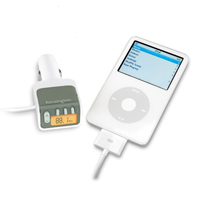
Review: Kensington Digital FM transmitter

My wife recently changed jobs, and though she will no longer have to do a bumper-to-bumper commute, when she does drive, it will be for longer distances and times. After a week she basically ordered me to get her an FM transmitter for her iPod because she was sick of stupid radio hosts.

We already own one FM transmitter, an AirPlay from XtremeMac. It's a decent unit but not spectacular. Its pros are that it's small, tunes to any station, and doesn't need batteries. However sound quality is mediocre and it doesn't work with post-4G iPods. Since my wife's iPod is a 1G nano, we needed to find her another solution.

So I did some research, primarily over at iLounge and quickly found that very few FM transmitters get good grades from their review section. One of the few exceptions was the Kensington Digital FM transmitter, which iLounge gave a grade of A-.

And I'm here to say that though it's expensive, this little unit is simply awesome. Audio quality is just as good as if not better than the radio, it charges your iPod, and it works with all iPods with a dock connector (which basically means anything after the very first generation iPod, with the exception of the iPod Shuffle). Since Apple is not likely to abandon its proprietary dock system anytime soon, it means that I won't have to buy another FM transmitter when I buy another iPod. It plugs into your car's 12-volt accessory outlet, tunes to any station and has three pre-sets.

Yes, it's expensive (US$80), but in this case, you definitely get what you pay for. Highly recommended.